Verification Protocols and Data Page Mechanics During a reisepass namensänderung
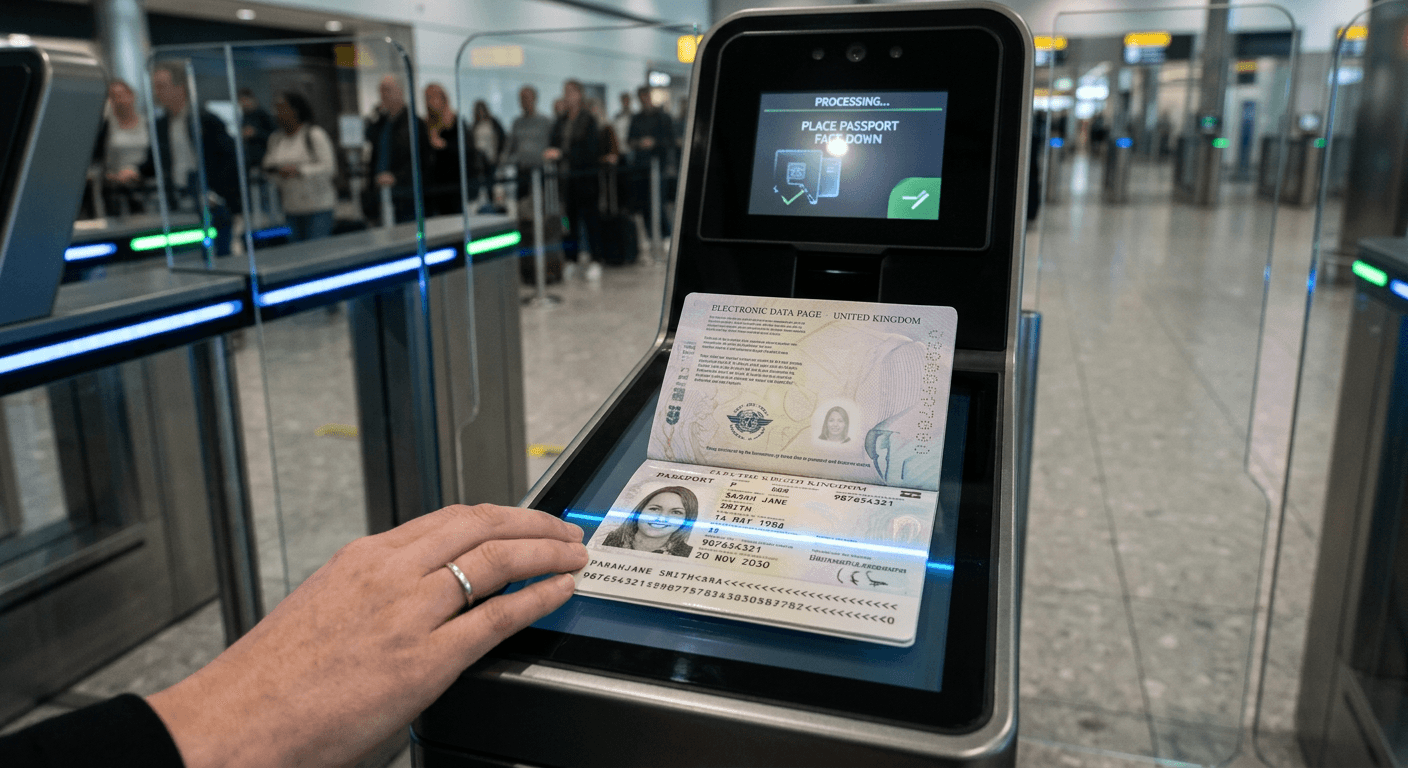
Many applicants assume the electronic chip inside a modern passport connects to a centralized global database that actively tracks their live travel history and continuous identity updates. In reality, the embedded microchip is entirely self-contained, operating exclusively as a cryptographically signed digital mirror of the physical printed data page. When you navigate a reisepass namensänderung after marriage or a civil status update, that digital mirror shatters if the newly printed surname no longer aligns exactly with your airline flight manifest or existing border control biometric records. Understanding precisely how automated boundary systems authenticate this single page of polycarbonate dictates whether you proceed seamlessly through electronic e-gates or face extensive secondary screening delays by immigration officers.
Quick Summary
The passport data page is a standardized identity document combining physical security features, machine-readable text, and a digital biometric record to verify traveler identity. Border verification protocols rely on a continuous cryptographic handshake between the printed visual page and its embedded microchip.
- The Machine Readable Zone (MRZ) initiates automated border control checks and unlocks the chip.
- Basic Access Control (BAC) prevents unauthorized remote scanning by requiring physical document presence.
- Stringent adherence to formatting prevents optical character recognition (OCR) failures at the e-gate.
- Infant data pages frequently trigger manual overrides due to rapid physical biometric changes.
- Document chips hold static data that cannot update dynamically after issuance.
Table of Contents
- Why a reisepass namensänderung breaks border verification protocols
- What biometric systems actually extract from the data page
- Where infant passports fail automated identity checks
- Three reasons your updated data page triggers secondary screening
- How cryptographic signatures prevent data page forgery
- FAQ
- Recommended Reads
Why a reisepass namensänderung breaks border verification protocols
When a citizen updates their legal name, the physical passport must be entirely reissued because electronic passports contain write-once memory. Border systems operate on an exact-match protocol between the Advance Passenger Information (API) transmitted by the airline and the text printed on the data page. The API requires the exact sequence of the traveler's primary identifier (surname) and secondary identifier (given names). If a traveler books a flight using their maiden name but presents a newly issued data page reflecting a reisepass namensänderung, the automated gate detects an immediate string mismatch.
This mismatch occurs at the foundation of the border check: the Machine Readable Zone (MRZ). The MRZ consists of two lines of 44 characters located at the bottom of the data page. It deliberately strips out hyphens, special characters, and spaces, substituting them with specific filler characters. When border algorithms compare the airline's Passenger Name Record (PNR) against the MRZ, they do not accommodate partial matches, legal aliases, or assumed names. The discrepancy instantly halts the verification protocol.
Furthermore, the mismatch prevents the initiation of Basic Access Control (BAC). BAC requires the optical character reader to scan the document number, date of birth, and expiration date from the MRZ to generate a symmetric session key. This specific key unlocks the RFID chip embedded in the booklet. If the system flags a name discrepancy against the flight manifest before initiating the scan, or if the interactive API (iAPI) system returns a "No Board" directive, the automated gate simply refuses to open. Immigration officials must then manually verify the marriage certificate or legal name change decree against both the canceled old passport and the active new data page.
Practical rule: Always book international flights using the exact alphanumeric name sequence currently printed in the Machine Readable Zone of your active data page, regardless of any pending civil status changes.
What biometric systems actually extract from the data page
The physical data page is strictly governed by the International Civil Aviation Organization (ICAO) Document 9303 standard. This global specification divides the polycarbonate page into two distinct functional areas: the Visual Inspection Zone (VIZ) and the Machine Readable Zone (MRZ). While human immigration officers manually inspect the VIZ for optically variable ink, holographic laminates, and microscopic tactile laser engraving, automated biometric systems interact exclusively with the digital chip and the OCR text.
The embedded chip does not transmit data continuously. To prevent remote skimming - where a malicious actor attempts to read the passport from a distance - the chip remains locked until the physical MRZ is optically scanned. The scanner relies on a mathematical checksum using a repeating weighting of 7, 3, and 1 applied to the MRZ characters. If a smudge on the data page causes the scanner to misread an 'O' as a '0', the checksum fails, the read error is generated, and the chip remains locked.
Once unlocked, the terminal establishes a secure channel to extract the digital facial image and the encoded biographical data. The extracted facial image is not a standard photograph; it is a specialized biometric template optimized for Principal Component Analysis (PCA) algorithms. These algorithms map the geometry of the face, identifying over 80 nodal points. The distance between the eyes, the width of the nose base, the depth of the eye sockets, and the jawline angle form a unique numerical code.
Precise adherence to strict passport photo requirements ensures these nodal points map accurately during the live camera capture at the border kiosk. Shadows cast by improper lighting can be misread by the PCA algorithm as bone structure, altering the numerical code and failing the verification against the chip's stored data. Reviewing the Germany Baby Passport Photo Guide ensures the biometric template aligns with stringent European processing parameters, minimizing the risk of a nodal mismatch when the optical character reader attempts its initial extraction.
Where infant passports fail automated identity checks
Automated border control gates are heavily engineered for adult facial geometry, relying on static bone structure, consistent skin textures, and fixed pupillary distances. Infant data pages introduce extreme variability into this rigid system, causing frequent algorithmic failures. An infant's facial structure changes dramatically within the first few months of life. The jawline drops, the nose bridge develops from cartilage into distinct bone, and the inter-pupillary distance widens rapidly.
Because the passport microchip holds a static biometric template locked permanently at the time of issuance, the live camera capture at a border crossing six months later rarely matches the stored data. Furthermore, infants often fail to comply with the live capture environmental requirements at e-gates. Biometric matching algorithms require the subject to look directly into the camera lens with a completely neutral expression, eyes fully open, and mouth entirely closed. Infants are typically asleep, crying, or looking away during the scanning process. The algorithmic confidence score plummets when it encounters a non-neutral expression or a tilted head axis, triggering an immediate rejection by the automated system.
Due to these inherent software limitations, most border control agencies disable automated e-gate access entirely for travelers under a specific age - typically 10 or 12 years old. Families traveling with infants must bypass the electronic kiosks and join the manual processing lane, where an immigration officer relies exclusively on the physical Visual Inspection Zone rather than the digital biometric template. Understanding these baseline constraints helps parents prepare the right documentation from the start. Consulting resources like the United States Baby Passport Photo Guide ensures the initial data page photo meets strict visual standards, making the subsequent manual override by the border officer as frictionless as possible. Parents handling complex international document logistics can also reference the Help Center for common technical snags related to formatting and printing specifications.
Three reasons your updated data page triggers secondary screening
A newly issued passport page that accurately reflects a recent name update can still fail automated validation at the border. When travelers are pulled aside for secondary screening, the delay usually stems from one of three distinct mechanical failures rather than a legal or civil issue with their actual identity. Knowing how to distinguish these failures allows you to isolate the problem efficiently.
1. Basic Access Control Handshake Failure
This is the most common mechanical error encountered at e-gates. The optical scanner must read the MRZ perfectly to generate the unlock key for the secure chip. If the polycarbonate data page is slightly bent, if fingerprint oils obscure a single character, or if the MRZ formatting deviates microscopically from standard specifications, the optical character recognition fails the checksum calculation. Symptom to check: The kiosk screen immediately flashes a "Document Read Error" or "Format Unrecognized" message before even attempting to activate the live facial camera. The fix: Wipe the MRZ clean with a microfiber cloth and hold the page completely flat against the glass pane, ensuring no uneven pressure warps the text lines.
2. Cryptographic Revocation and Sync Delays
When a country issues a new passport, it digitally signs the encoded data with a unique electronic certificate. Border control terminals cross-reference these certificates against an international Public Key Directory (PKD) to ensure the physical document is authentic and has not been revoked. If your passport was printed within the last 48 hours, the issuing country may not have finished updating the international PKD with the newest batch of valid certificates. Symptom to check: The machine reads the page successfully, activates the camera, takes your photo, but then issues a "Chip Authentication Failure" or "Status Unknown" error. The fix: This requires a manual verification by a supervising officer. It typically resolves itself within a few days as international directories sync their respective databases.
3. Live Facial Geometry Mismatch
The physical page reads correctly, the chip unlocks via BAC, and the cryptographic signature validates against the PKD, but the live photo captured at the gate does not match the stored biometric template. This occurs frequently if the traveler has undergone significant weight changes, facial reconstructive surgery, or if the original printed photo was poorly lit and masked natural bone structure. Symptom to check: The gate takes unusually long to process the live image, prompts you repeatedly to remove glasses or hats, and then definitively rejects the match. The fix: Step back, ensure your face is fully and evenly illuminated by the kiosk lighting, look directly at the optical lens, and maintain a completely neutral, relaxed expression.
Practical rule: If a border kiosk rejects your data page twice in a row, do not attempt a third scan; repeated failed authentication handshakes will automatically lock the digital chip to prevent brute-force attacks, forcing a mandatory manual override for every subsequent flight on that passport.
How cryptographic signatures prevent data page forgery
The physical security features of a data page - such as tactile laser engraving, complex watermarks, and holographic overlays - deter amateur forgery, but they offer little defense against sophisticated state-sponsored counterfeiting. To counter advanced threats, modern electronic passports rely heavily on a rigid Public Key Infrastructure (PKI) to guarantee the integrity of the data. This digital security framework ensures that altering a single pixel of the stored biometric photo or a single letter in the given name invalidates the entire document instantaneously.
The primary defensive mechanism is Passive Authentication (PA). When the government issues a new passport, it calculates a complex digital hash of all the biographic data and the biometric template stored on the chip. It then encrypts this specific hash using a private key exclusively held by the issuing state's Document Signer Certificate (DSC). At the border, the e-gate uses the state's widely distributed public key to decrypt the hash. If a forger manages to alter the surname in the chip's memory to match a fake physical print, the recalculated hash will not match the decrypted hash, exposing the tampering immediately to the terminal.
For highly sensitive biometric data, such as high-resolution fingerprint templates, passports utilize Extended Access Control (EAC). Unlike basic facial images, fingerprint data requires much stronger isolation. EAC demands mutual authentication: the passport chip mathematically verifies that the specific e-gate scanner is explicitly authorized by the destination country to read fingerprints, and the scanner simultaneously verifies the chip's authenticity. This two-way cryptographic handshake ensures that stolen border control equipment cannot be used to secretly harvest fingerprint data from travelers.
Familiarity with these rigid underlying protocols highlights why adhering strictly to international formatting is entirely non-negotiable. For instance, reviewing the United Kingdom Baby Passport Photo Guide ensures the physical output matches the rigid biometric thresholds required by EAC-enabled systems operating in modern airports. Travelers requiring broader cross-border standards can consult the EU & International Baby Passport Photo Requirements & Guides to understand exactly how different member states implement these cryptographic checks in practice.
Data Page Security Layers
| Security Layer | Primary Mechanism | Purpose in Identity Verification |
|---|---|---|
| Machine Readable Zone (MRZ) | Optical Character Recognition (OCR) | Generates the initial key to unlock the embedded microchip. |
| Basic Access Control (BAC) | Symmetric Cryptography | Prevents remote skimming by requiring physical possession of the page. |
| Passive Authentication (PA) | Digital Signatures (PKI) | Guarantees the stored biometric data has not been altered since issuance. |
| Extended Access Control (EAC) | Mutual Authentication | Restricts sensitive fingerprint access to authorized border agencies only. |
| Active Authentication (AA) | Challenge-Response Protocol | Prevents physical hardware cloning of the passport microchip. |
FAQ
Does the electronic passport chip track my live location?
No. The embedded microchip utilizes passive RFID technology, meaning it possesses no internal power source or battery. It only transmits data when placed within millimeters of a powered border control scanner, making remote location tracking physically impossible.
How long does the cryptographic signature on the data page last?
The digital certificate signed by the issuing government typically matches the physical expiration date of the passport - standardized at ten years for adults and five years for minors. Once expired, the certificate is automatically flagged as invalid by the international Public Key Directory.
Can automated border gates process passengers traveling with infants?
In most jurisdictions, automated gates are intentionally disabled for passengers under a specific age threshold, usually 10 to 12 years old. Because infant facial geometry changes rapidly, the live algorithmic capture cannot reliably match the static template stored on the microchip, requiring manual intervention.
What happens if the machine readable zone is physically damaged?
If a deep scratch, smudge, or heavy crease obscures a single character in the machine readable zone, the optical character recognition fails to generate the correct checksum. This prevents the generation of the decryption key, entirely blocking access to the digital chip and forcing a manual identity verification.