How to Locate Your ID Passport Number and Read the Data Page
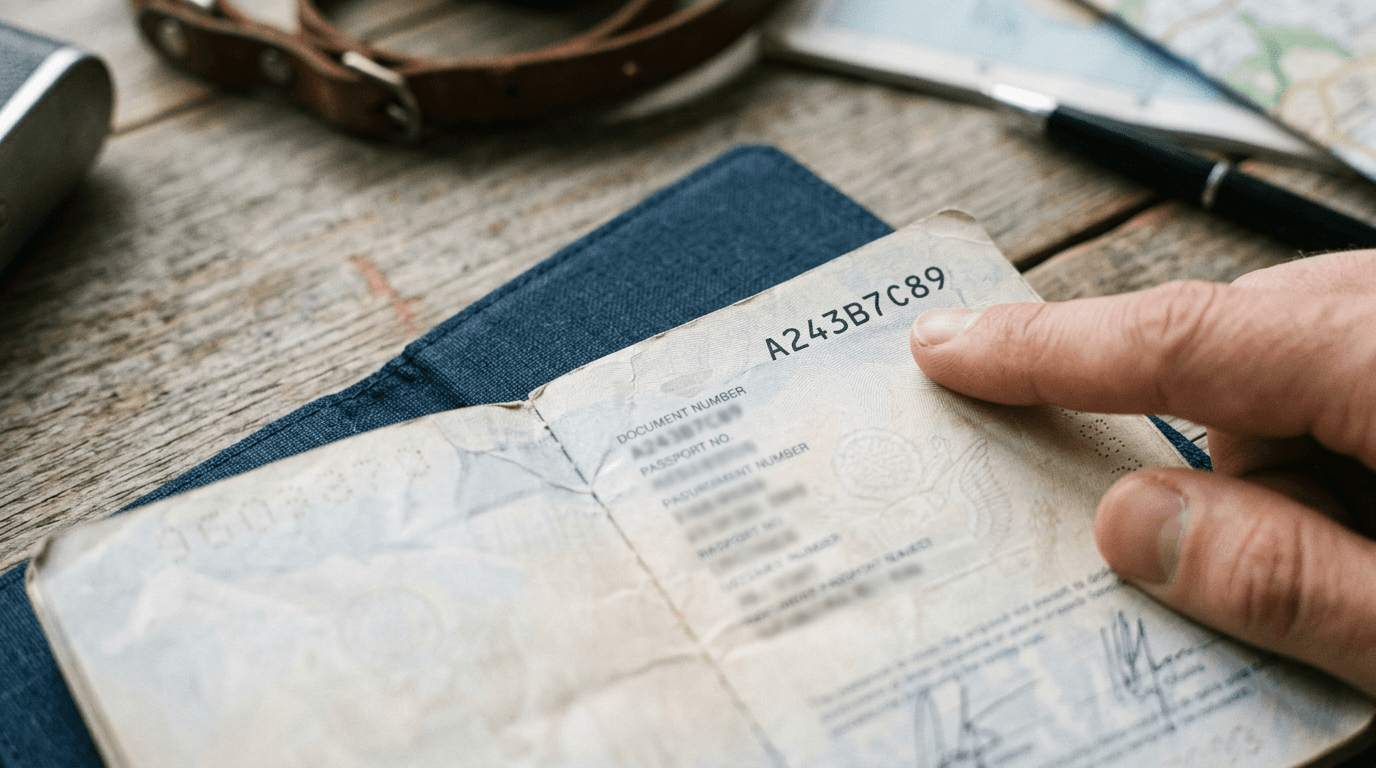
You are staring at the first page of an infant's newly minted travel document, trying to locate the exact id passport number required by an airline's booking system. The physical card contains three distinct alphanumeric strings: one stamped at the top, a longer sequence embedded in the photo area, and a dense block of text running across the bottom. If you enter the wrong sequence into the advance passenger information system, the automated gate at the border will reject the boarding pass. Travel document layouts are not arbitrary; they follow rigid international standards that dictate where your data sits and how machines read it. Recognizing how these systems extract and verify your information prevents check-in delays and application rejections.
Quick Summary
The passport data page is the critical biographical section of a travel document that houses the traveler's photo, personal details, and the machine-readable zone. Understanding its layout allows you to identify the correct document identifiers and avoid automated rejections at the border.
- The document number changes with every renewal and sits in the upper right corner.
- The personal identification code remains static and is not used for flight manifests.
- The machine-readable zone at the bottom contains checksum digits that validate the printed text.
- Minors face strict validity limits that trigger automatic system denials if miscalculated.
Table of Contents
- How to Isolate the Right ID Passport Number
- Why the Passport Data Page Causes System Mismatches
- How Issuing States Differentiate Identification Systems
- Where the Passport Expiration Date Triggers Denials
- The Three Ways Data Validation Breaks Down at the Border
- FAQ
- Recommended Reads
How to Isolate the Right ID Passport Number
When airlines and visa applications request an id passport number, they are asking for the unique sequence assigned to that specific physical book. This document number almost always sits in the upper right-hand corner of the biographical page. It operates as an inventory tracking mechanism for the issuing government, proving that the booklet itself is valid and not reported stolen.
The document number is entirely distinct from a citizen's national identity number. When you apply for a new travel document, the document number changes, even if the traveler's personal details remain identical. This distinction is critical when applying for an electronic travel authorization or checking in for a flight. If you input a national identity number instead of the booklet's document number, the airline's background check against the international database will return a mismatch, denying the boarding pass.
Modern documents often punch or perforate the document number through the subsequent visa pages of the book. This physical alteration prevents fraudsters from swapping the biographical page of one booklet into the covers of another. For parents managing multiple travel documents for infants, verifying that the perforated number matches the printed sequence on the primary page confirms the booklet's structural integrity.
Practical rule: If the sequence you are typing contains more than nine characters, you are likely looking at the personal code rather than the document number.
Why the Passport Data Page Causes System Mismatches
The passport data page is divided into two distinct operating areas: the Visual Inspection Zone (VIZ) and the Machine Readable Zone (MRZ). System mismatches occur when travelers or booking agents rely solely on the VIZ while the border control gates rely entirely on the MRZ.
The VIZ contains the human-readable text and the photograph. It is formatted according to local language conventions alongside English, French, or Spanish translations. However, human-readable text is prone to layout variations depending on the issuing state. The MRZ, located at the bottom edge of the page, strips away these variations. It forces all biographical data into two or three lines of uniform, OCR-friendly (Optical Character Recognition) text using filler characters to maintain a rigid width.
Conflicts arise when names containing special characters or hyphens in the VIZ are flattened for the MRZ. A name like "O'Connor" in the visual zone becomes "OCONNOR" in the machine-readable section. If an airline ticket is booked using the exact punctuation from the visual zone, the automated gate will flag a discrepancy when scanning the MRZ. Reviewing the guide to international baby passport photo requirements clarifies how these standardized zones leave no room for creative data entry.
| Zone | Primary User | Format Rules | Vulnerability |
|---|---|---|---|
| Visual Inspection Zone (VIZ) | Border Agents, Hotel Clerks | Human-readable, allows local characters and hyphens | Subjective interpretation of spacing and special characters |
| Machine Readable Zone (MRZ) | Automated Gates, API Systems | Strict A-Z, 0-9, filler brackets (<), no punctuation | Truncation errors if physically scratched or poorly scanned |
| Embedded NFC Chip | Cryptographic Verification | ICAO standardized digital payload | Unreadable if the antenna inside the cover is bent or snapped |
How Issuing States Differentiate Identification Systems
Governments manage populations using a passport identification number architecture that tracks both the individual and the document. Understanding this separation clarifies why certain forms require different fields. The International Civil Aviation Organization (ICAO) standardizes travel documents globally, but leaves the exact internal structure of the alphanumeric codes to the issuing state.
Some nations generate document numbers purely sequentially, meaning the number reveals nothing about the bearer. Other countries embed region codes, issuing office identifiers, or the year of issuance directly into the sequence. When systems require a passport identification number, they are generally pulling the alphanumeric string from the upper right of the visual zone to cross-reference against international interpol databases of lost or stolen books.
The presence of an additional "Personal Number" or "National ID" on the data page confuses many applicants. This secondary sequence ties the traveler to their domestic tax or healthcare records. Issuing states include it to allow the travel document to function as a domestic identity card. However, international border systems do not index this personal number. Entering it on an international arrival card will result in an "invalid format" error. To see how strictly individual nations enforce these formatting rules, you can review the United States baby passport photo standards which highlight the exact layout expectations for acceptable documentation.
Where the Passport Expiration Date Triggers Denials
The passport expiration date is rarely the actual date your travel privileges end. The vast majority of international system denials stem from travelers treating the printed expiry date as a hard boundary, ignoring the regional validity buffers enforced by destination countries.
The Schengen Area, alongside many Asian and Middle Eastern nations, enforces a strict validity buffer. The document must remain valid for a minimum of three to six months beyond the intended date of departure from that region. If the printed expiration date falls within this buffer period, the airline's advance passenger information system will physically lock the check-in process. The system does not care that the document is technically valid on the day of the flight.
This buffer creates a hidden failure mode for families traveling with infants. Because minor documents often carry a five-year validity instead of the standard ten years, the six-month buffer consumes a massive ten percent of the document's total lifespan. Parents frequently calculate validity based on their own ten-year documents, missing the accelerated timeline of their child's booklet. Understanding this timeline is just as critical as meeting the Australian baby passport photo specifications when preparing for a trip. If the date breaches the buffer, border control views the document as already expired.
The Three Ways Data Validation Breaks Down at the Border
Automated border control relies on exact character matching. When a traveler is pulled out of a digital queue and sent to a manual desk, the failure almost always stems from one of three specific data page translation errors. Knowing which error you have allows you to bypass the automated gate and seek manual entry without panic.
Character Confusion in the Alphanumeric Sequence
The most frequent cause of an immediate booking rejection is confusing the letter "O" with the number "0", or the letter "I" with the number "1". In the standardized MRZ font, these characters are notoriously difficult to distinguish.
- Symptom: The airline website or visa portal throws an "invalid format" error the moment you click submit.
- Diagnosis questions: Is the error immediate? Does the document number contain a circular character?
- Resolution: Examine the MRZ line at the bottom. If the character appears in the primary document sequence but has a filler bracket (<) immediately after it, the system expects a letter.
The Name Truncation Mismatch
Many database systems limit the primary surname field to a specific character count. If a traveler has a hyphenated or multi-part surname that exceeds 39 characters, the MRZ will physically truncate the name.
- Symptom: The boarding pass prints successfully, but the automated gate flashes red and refuses to open.
- Diagnosis questions: Is the surname longer than the available space on the MRZ line? Did you book the ticket using the full name, but the machine only read the shortened MRZ version?
- Resolution: Manual border agents can override this by verifying the VIZ against the ticket.
The Checksum Verification Failure
The numbers in the MRZ are followed by a single digit known as a checksum. This digit is calculated using a mathematical algorithm based on the preceding numbers.
- Symptom: A mobile app scanning the physical card repeatedly fails, but typing the numbers manually works.
- Diagnosis questions: Are you scanning the document under a harsh overhead light?
- Resolution: Glare on the polycarbonate data page frequently obscures the final checksum digit. If the camera reads an "8" but the mathematical checksum expects a "3", the app rejects the scan. Repositioning the document to eliminate the reflection solves the error. Familiarizing yourself with the UK baby passport photo criteria demonstrates how carefully lighting is controlled to prevent these exact verification failures.
FAQ
Where exactly is the document number located on the data page?
The document number is positioned in the upper right corner of the biographical page. It is also embedded within the first nine characters of the machine-readable zone at the bottom of the card.
Does the identification number change when I renew?
Yes. The document identifier changes every time a new booklet is issued. Any visas tied to the old alphanumeric sequence may require an official transfer or the carrying of both the old and new booklets.
Why does my document have a personal code and a document number?
The personal code functions as a domestic identifier for internal government records, similar to a tax or healthcare ID. The document number tracks the physical booklet for international travel.
What happens if the printed expiry date falls within my travel window?
If the expiry date falls within the destination country's required validity buffer (usually three to six months from your departure date), automated check-in systems will deny boarding, treating the document as invalid for that specific journey.