Top Passport Photo Maker Solutions for 2026: A Comparative Review
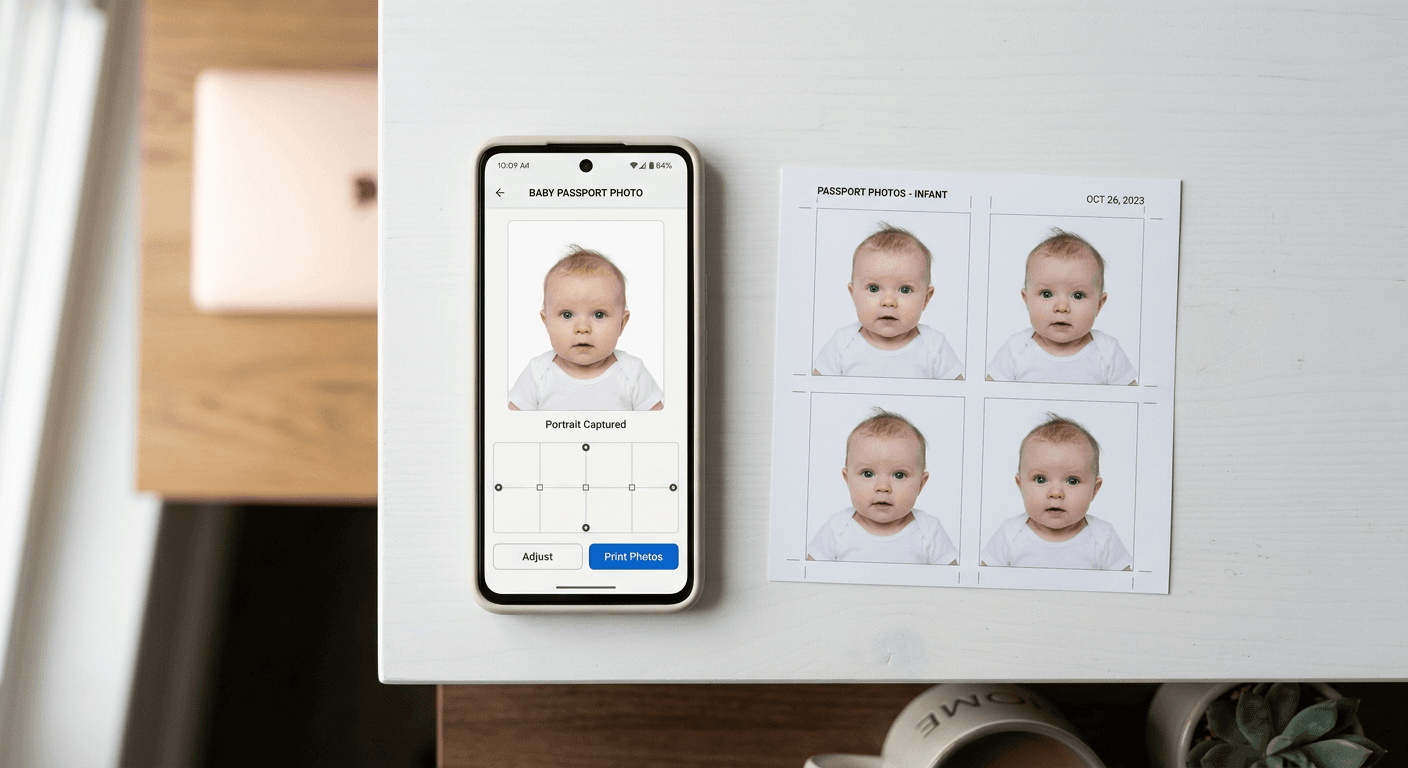
Obtaining compliant identification imagery has evolved significantly, shifting from the traditional constraints of physical booths and professional studios toward sophisticated, automated digital platforms. For travelers and families, selecting the right passport photo maker requires balancing strict government biometric standards with the need for convenience and speed. Whether you are preparing for a visa application or a standard passport renewal, the technical requirements - such as precise head centering, specific background colors, and correct digital dimensions - remain non-negotiable.

Quick Summary
Selecting an effective passport photo maker in 2026 involves evaluating automated compliance engines that handle biometric verification, cropping, and background removal. These tools allow users to capture valid images using standard smartphones.
- AI-driven auto-formatting ensures compliance with international standards.
- High-resolution exports are required for both digital submissions and physical prints.
- Immediate compliance checks prevent costly application rejections.
- User-friendly interfaces are critical for photographing infants or non-compliant subjects.
Table of Contents
- Comparison Table of Identity Photo Services
- AI-Automated Digital Platforms
- Professional Studio Services
- Self-Service Government-Certified Apps
- DIY Manual Editing Tools
- How to Choose the Best Passport Photo Maker
- FAQ
- Recommended Reads
Comparison Table of Identity Photo Services
| Feature | AI-Automated Platforms | Professional Studios | Self-Service Apps | DIY Editing Tools |
|---|---|---|---|---|
| Compliance Rate | High (Automated) | Very High | Moderate/High | Variable |
| Turnaround | Seconds | 15-30 Minutes | Minutes | Varies |
| Cost | Low | High | Low/Free | Free |
| Convenience | Excellent | Low | High | Moderate |
| Target Audience | Families & Travelers | Professionals | Casual Users | Tech-Savvy Users |
AI-Automated Digital Platforms
AI-powered solutions represent the current gold standard for convenience. These platforms specialize in transforming raw smartphone images into government-compliant files by automatically stripping complex backgrounds and adjusting head sizes to meet specific biometric requirements, such as those found in a detailed guide for US baby passport photos.
These tools are particularly effective for infant photography, where capturing a still, neutral-expression shot is notoriously difficult. By automating the technical post-processing, parents can focus on the capture phase, knowing the software will handle the intricate pixel-level adjustments required by various immigration offices. Utilizing a high-quality passport photo maker allows users to iterate quickly until a compliant result is achieved, often saving significant time compared to professional appointments.
- Pros: Fast processing times, high compliance accuracy, accessible 24/7.
- Cons: Dependent on initial image quality (lighting and focus).
Professional Studio Services
Professional photography studios remain a viable option for applicants who prefer a hands-off approach or have unique lighting needs that smartphone cameras cannot adequately address. These experts provide controlled lighting environments and can manually ensure that complex biometric standards are met.
While this category offers the highest level of human oversight, it lacks the flexibility of digital platforms. For families, visiting a studio with a newborn can be logistically challenging. However, for those who find the technical requirements of a digital passport photo online free tool daunting, the physical expertise of a photographer provides peace of mind through professional prints that are ready for immediate submission.
- Pros: Physical prints provided, expert lighting control, no technical work for the user.
- Cons: Expensive, requires travel, limited business hours.
Self-Service Government-Certified Apps
Smartphone applications specifically designed for biometric capture offer a hybrid approach. These apps typically leverage the phone's native camera while providing an overlay interface to help the user align the subject's face correctly. Some apps are specifically optimized to generate a digital passport photo that is ready to be uploaded to government portals without the need for additional desktop software.
These solutions are ideal for applicants who require a quick, cost-effective solution but still want the validation features that basic photo editing software lacks. Many of these apps include built-in guides that verify requirements for specific documents, such as those required for UK baby passport photos, ensuring that common errors like shadows or incorrect eye levels are avoided during the capture process.
- Pros: Portability, integrated compliance overlays, instant digital downloads.
- Cons: Subject to phone camera sensor limitations.
DIY Manual Editing Tools
Manual editing software is suitable only for individuals with significant graphic design experience. These tools require the user to possess a deep understanding of biometric standards - such as the exact millimeter-based dimensions required by authorities in places like Australia or Germany.
Without an automated compliance engine, users must manually calculate pixel density and head-to-chin ratios. This path is high-risk, as even minor misalignments can lead to application rejection. Unless you are highly proficient in image editing, relying on tools that do not provide an automated compliance guarantee is generally discouraged when processing Australian baby passport photos or similar high-stakes documents.
- Pros: Full control over every pixel, cost-effective.
- Cons: Steep learning curve, high risk of rejection, no automated compliance checks.
How to Choose the Best Passport Photo Maker
When selecting a service, prioritize the platform's ability to handle your specific country's regulations. Not all passport photo makers are updated with the latest biometric standards, which can change frequently. Look for platforms that offer clear terms regarding their service expectations and a transparent policy for handling rejected photos.
Additionally, consider the quality of the output. Government agencies often require a specific DPI (dots per inch) and file format (typically JPEG). Ensure your chosen platform provides high-resolution, uncompressed files. For those with complex needs, such as applying for multiple visas, verify if the service provides custom sizing options beyond standard passport dimensions. Always review the help section of any platform you use to ensure your specific use case is covered by their support infrastructure.
FAQ
- Can I take a passport photo at home with my phone? Yes, provided you have adequate, even lighting, a neutral background, and an application to ensure correct biometric formatting.
- What is the most common reason for passport photo rejection? Improper head sizing, poor lighting (shadows), or wearing accessories that obscure facial features.
- Do I need to print my passport photo, or is digital enough? This depends on your specific application; some countries now accept digital-only submissions, while others mandate physical prints.
- How does a passport photo maker ensure compliance? By using AI to analyze key facial landmarks, measure head proportions, and normalize the background to the required color specifications.